SSH Agent Automation

On Linux systems many of us administrators and engineers have our favorite profiles and configuration file settings. One of the most used tools and a must for securing an environment is secure shell or ssh. Secure shell uses asymmetric encryption which is a public key and private key pair of keys; one used for encryption and the other for decryption. Open SSH allows for several different algorithms such as DES or RSA. The public encryption key may then be shared to other systems in the ~/.ssh/authorized_keys file indicating that a system having the correct key information may be allowed to ssh directly into a system using only the public key challenge. Further the public and private key pair may be associated with a passphrase requiring such to be entered before the asymmetric key pair may be used for authentication.

Many DevOps Infrastructure as Code tools and other management tools and even home grown scripts may use ssh to manage through inquiry and remote execution multiple systems in an environment. The ssh passphrase requirement may get in the way of such automation and cause such batch processes to fail. The ssh-agent was created to resolve this limitation by registering passphrases and keys so that subsequent ssh sessions would not be prompted for passphrases. The script below may be added to a .bashrc or .kshrc user profile to instantiate a ssh-agent which may be used by subsequent session. It createa a link to the ssh-agent special file as ~/.ssh/ssh_auth_sock and updates the SSH_AUTH_SOCK environment variable to point to this link. This then allows sessions going forward to piggyback off the initial ssh-agent instantiation. This may also be used with scheduled jobs.

## Check if the agent is accessible and if not remove socket file and kill agents
export SSH_AUTH_SOCK=~/.ssh/ssh_auth_sock
ssh-add -l >/dev/null 2>&1 ; RT=$?
if [ -h ~/.ssh/ssh_auth_sock -a ${RT} -gt 0 ]; then 
	echo "SSH Agent is dead ${RT}; removing socket link file and killing hung ssh agent!"
	rm -f ~/.ssh/ssh_auth_sock 
	pkill -u $(whoami) -i ssh-agent 
fi
## if the auth socket does not exist start the agent and recreate the auth socket link
if [ ! -h ~/.ssh/ssh_auth_sock ]; then
	echo "Ssh agent socket link does not exist; starting new agent!"
	eval `ssh-agent`
	ln -sf "$SSH_AUTH_SOCK" ~/.ssh/ssh_auth_sock
fi
export SSH_AUTH_SOCK=~/.ssh/ssh_auth_sock
ssh-add -l > /dev/null 2>&1 || ssh-add

IBM Storewize and FlashSystem Storage Upgrades

Introduction

In an Enterprise setting upgrading storage infrastructure is quite different from running updates on your home PC; or at least it should be. While updates expand functionality, simplify interfaces, fix bugs and close vulnerabilities they can also introduce new bugs and vulnerabilities. Sometimes the new bugs are contingent upon factors which exist in your environment and can result in encountering the issue the bug creates. In an Enterprise environment where many users and sometimes customers rely upon the storage infrastructure the impact of an issue caused by an upgrade can be broad and affect business credibility with potentially even legal ramifications. Therefore, having a process to mitigate as many risks as possible is a necessity. The process presented here rests in a general framework with specific steps related to IBM Midrange StoreWize V5000, V7000 and Flash Storage.

High-level Overview

The process described at a high-level here is a good general framework for any shared infrastructure upgrade in an Enterprise environment.

  1. Planning
    • Document current environment cross section from CMDB and/or direct system inquiry.
      (Server Hardware Model, OS and Adapter Model/Firmware/Driver as well as SAN Switch Model/Firmware and current Storage Model/Code Level)
    • Ensure the SAN infrastructure is under vendor support so that code may be downloaded, and support may be engaged if any problems are encountered.
    • Download and Review Release notes for the top 3 recent code releases.
    • Use vendor interoperability documents or web applications to validate supportability in your environment using the information gathered above.
    • Choose the target code level. (Often N-1 is preferred over N, bleeding edge latest releases, unless significant vulnerabilities or incompatibility with your environment exists.)
  2. Preparation
    • Download the target release installation code and any upgrade test utilities provided by the vendor.
    • Upload the target code and test utility and run test utility.
    • Run initial health checks on the storage systems.
    • Gather connectivity information from SAN and Storage devices and verify connection and path redundancy.
    • Initiate a resolution plan before scheduling the upgrade for any identified issues.
    • Submit change control and obtain approval for upgrade.
  3. Upgrade
    • Rerun the upgrade test utility to verify issues are still resolved.
    • Run configuration backup, diagnostic snapshot and list logs to a file downloading each to a central configuration repository.
    • Perform health checks
    • Clear logs and clean diagnostic snapshots
    • Initiate any prerequisite components microcode upgrades (drive firmware, etc) and validate completion.
    • Initiate system update and monitor upgrade process
    • Upon completion validate upgrade, perform health checks and validate the dependent systems connectivity.
Read more of this post

VMWare vSphere Discovery and Inventory

As an Infrastructure Engineer or Architect you need to have a good grasp on what systems comprise your environment. In the past this was somewhat straight forward. You kept a configuration item database in your CMDB and teams had their workbooks and playbooks. However, in this new world of DevOps and CI-CD and their automation tool sets such as Terraform, Chef, Ansible, Bladelogic, and many others; developers can stand up their own virtual instances and tear them down. This can make it hard to have a complete picture of your environment. This can be especially difficult for storage infrastructure since many virtual instances can be deployed on large data stores and when there is an IO performance problem tracking down the related hardware can be like following the rabbit to wonderland.

I ran into this while leading several projects for storage infrastructure servicing an ESX environment and developed a powercli script to pull the necessary virtual instance and data-store data from the VSphere systems. First you will need to install powercli for VMware which can be found here:
https://developer.vmware.com/web/tool/12.4/vmware-powercli

Read more of this post

Fixing Excel Data – Text to Rows and Fill Down

Image via Wikipedia

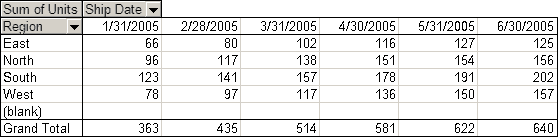
Excel spreadsheets are used at almost every level of business.  As such spreadsheets are created by people with different goals and different levels of familiarity.  What many don’t realize is that excel is primarily a data processing and information storage tool.  Excel is much like a database and is most effective when data is stored as one would store information in a database.  The problem is that data in a database isn’t necessarily that presentable.  So many people input information into excel and attempt to format it for presentation.  Many people create groups and merge cells or insert multiple entries into a single cell and then apply special formatting.  The down side is when someone wants to use the graphing and report building features of excel the combined or grouped data isn’t accessible because it is either missing from cells due to cell merging or each entry isn’t accessible on its own because it has been entered into a single cell.  The best method is to treat the data as a database and ensure that each cell in a column has data in it relative to the cells in the row so that a complete record is available.  Then use the grouping and pivot table features to create reports that are presentable and much more functional because the data can be grouped and categorized in two dimensions.

Read more of this post

Optimizing Disk IO Through Abstraction

To Engineer or Not To…

When disk capacity is released to a new application or service many times the projects do not consider how best to use the storage that has been provided. Essentially the approaches fall into one of two schools of thought. The first is to reduce upfront engineering into a couple design options and resolve issues when they arise. The second is to engineer several solution sets with variable parameters that will provide a broader pallet of solutions and policies from which an appropriate solution may be selected.

Reduced Simplified Engineering

  • Apply one of a couple infrastructure designs to a project.
  • This approach involves less work upfront, has a simpler execution and involves less work gathering requirements.
  • Potentially more time and effort will be spent resolving issues when resources and design are insufficient.
Read more of this post

Storage Capacity KPIs

When I first started working with Distributed Storage for many years I worked with Asset Management and various other departments to answer the question, “How much storage do we have available and how much is used?”. The problem was depending upon how the numbers were sumarized and presented various impressions were left with management that didn’t communicate a complete picture. This invariably led to inaccurate assumptions that required many subsequent explanations. If we are to overcome these problems and communicate a clear picture of storage capacity we must address several issues.

The first issue to be addressed is whether to report storage capacities as raw capacity or usable capacity. The simplest method is to report raw but since these numbers do not take into account protection and management overhead service delivery management is tempted to think that more storage is available then what is available in reality. If these overheads aren’t taken into account when projecting future demand the projected supply may be overstated. For this reason it is probably best to provide facilities for reporting both raw numbers which will be used more in the day to day support and usable numbers for planning and estimation purposes.

Read more of this post

Pushing Your Profile and SSH Keys

When ever you start supporting a new environment especially in a large corporation usually you are confronted with many systems.  Security will take care of setting up your access across whatever platforms there may be.  But generally you are left holding the bag with setting up your ssh keys and any profile customizations not to mention distribution of any scripts or tools you have come to rely upon.  Of course before you put any tools on a system there are several things to consider.  You definitely want to consider the environments you are first performing the distributions on and it is always good to start with development or lab environments and move out from there.  Also you will need to consider the corporate policies related to the environment which might limit your ability to even have your own set of tools and scripts.  You may be limited down to simple .profile changes and ssh keys.  Implementing a script to push these keys and profiles out may need to go through various degrees of red tape.  Whatever policies and requirements exist in your organization are your responsibility to know and to determine how or if the tools discussed here may be used.

Read more of this post

Design a site like this with WordPress.com
Get started